
ChatGPT Product Feed: The Complete Merchant Guide
ChatGPT product feed ads launched June 2026: upload a Google Shopping-format catalog (100 SKU minimum, up to 1M) and ChatGPT auto-generates product ads matched to conversational intent. Here is the full merchant setup.
Viren Inaniyan · August 29, 2026 · ChatGPT Ads
ChatGPT product feed ads launched in June 2026, and they work almost nothing like Google Shopping - except for the feed itself, which is deliberately identical. Upload your Google Shopping-format catalog, and ChatGPT auto-generates product ads matched to what people are actually discussing, not what they typed into a search box. The catch: thin, messy feeds get locked out before they spend a dollar.
What a ChatGPT product feed is
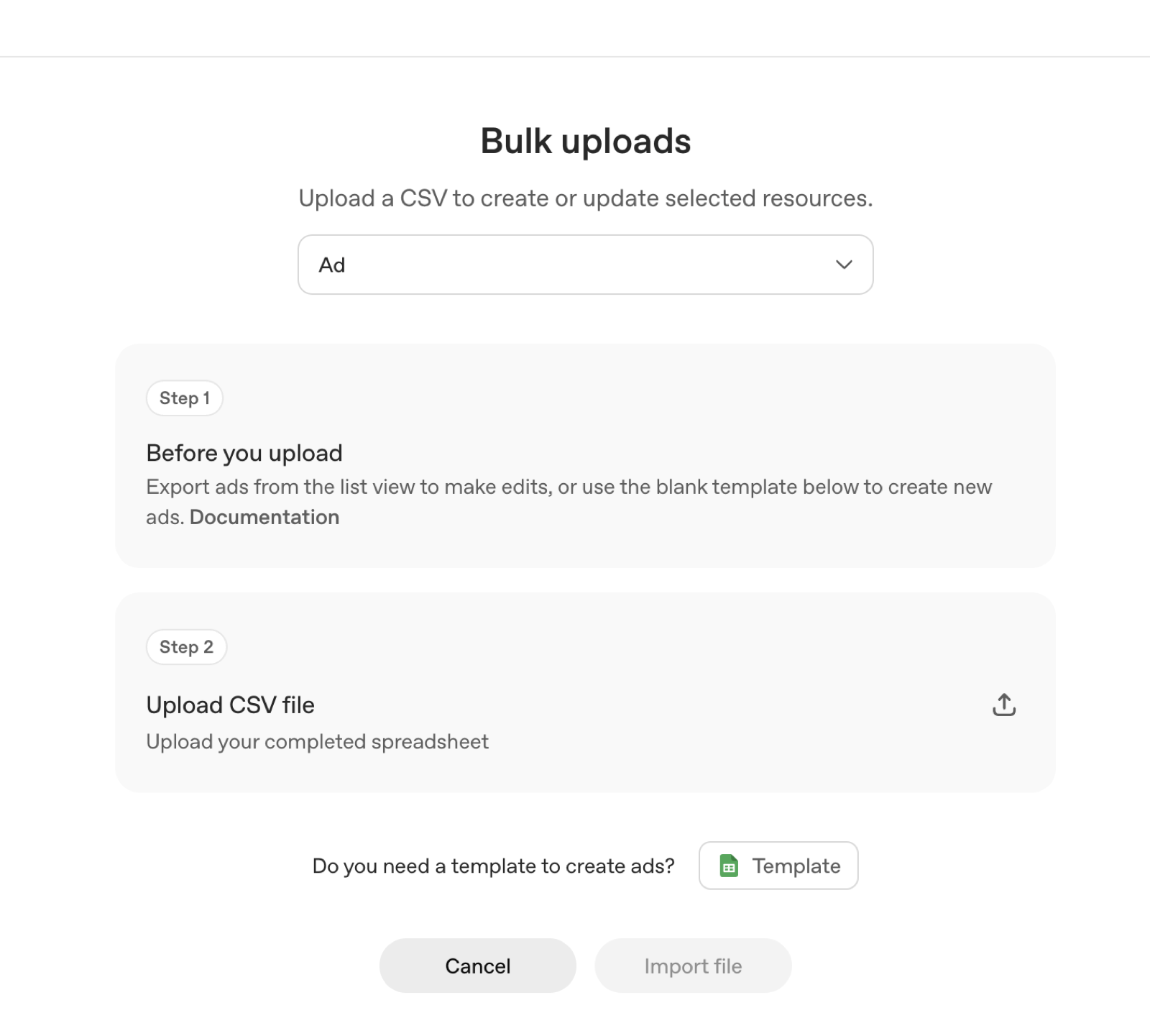
A ChatGPT product feed is a structured catalog file you upload to ChatGPT Ads Manager so ChatGPT can generate product ads on your behalf. Instead of writing one ad with one title and one image, you hand OpenAI your whole catalog - names, images, prices, attributes, availability - and the system assembles a relevant product ad the moment a conversation turns commercial.
The feature launched in June 2026 as part of the self-serve Ads Manager Beta that opened at ads.openai.com in May 2026 with no minimum lifetime spend (OpenAI, May 2026). It arrived four months after OpenAI began testing ads in ChatGPT in the US on February 9, 2026, and it changed what a merchant needs to bring: not ad copy, but a clean catalog.
Two numbers frame the opportunity. AI-referred visits to US retail sites convert 60% better than non-AI traffic (Adobe Analytics via Digital Commerce 360, July 2026 data), and ChatGPT ads have already hit $100M in annualized revenue (eMarketer, 2026). Feeds are how product sellers plug into both sides of that.
How to upload your feed, step by step
1. Get an Ads Manager account serving-ready. Sign up at ads.openai.com. Before any campaign serves, you need business details, a tax ID, a billing method, Persona identity verification, and an account logo. Billing is postpay. Our ChatGPT ads setup guide walks through the full onboarding.
2. Go to Tools, then Feeds. Feed upload lives in the Tools menu of Ads Manager, under Feeds. This is where you add, replace, and manage catalogs.
3. Upload a Google Shopping-format file. OpenAI reused the Google Shopping schema deliberately (OpenAI Ads Manager docs; Digiday, June 2026). If you already run Shopping campaigns, the feed you export for Google Merchant Center works here - same titles, descriptions, GTINs, images, prices, and availability fields.
4. Clear the SKU thresholds. The minimum is 100 SKUs; the maximum is 1 million. A catalog under 100 products cannot activate feed ads - you can still run standard single-creative campaigns, but not the auto-generated product format.
5. Attach the feed to a campaign and set context hints. Campaign objectives are Clicks or Reach, with a $25 minimum daily budget. Bidding is Maximize results or Manual Max CPC in a relevance-weighted second-price auction; typical 2026 starting bids run $3-5 CPC (WebFX; OpenAI docs, 2026). Bid models span CPM, CPC, and conversion-optimized CPC - OpenAI optimizes delivery toward your chosen conversion event but still charges per click (OpenAI Help Center, article 20001210).
Required and recommended feed fields
The spec, published in OpenAI's developer documentation (developers.openai.com), starts from the Google Shopping standard set. The required basics get your feed accepted; the enriching fields give the matching model more to work with.
| Required basics | Enriching fields |
|---|---|
| id - unique product identifier | product_type - your own category taxonomy |
| title and description | sale_price - promotional pricing alongside list price |
| link - product landing page URL | shipping - cost and destination details |
| image_link - primary product image | size and color variant attributes |
| price and availability | ratings and review data |
| brand, plus GTIN or MPN | condition beyond the default "new" |
Beyond the Google Shopping baseline, the spec defines OpenAI-specific flags - including visibility and checkout-eligibility fields that control whether a product can appear in ChatGPT and whether it qualifies for in-chat purchase. If you export straight from Merchant Center, those flags are the one part of the file that will not carry over automatically; check the spec before you upload. For the full field-by-field breakdown, see our guide to ChatGPT product feed requirements.
ChatGPT product feed vs Google Shopping feed
Same file format, different machine reading it. The five differences that matter:
| Dimension | ChatGPT product feed | Google Shopping feed |
|---|---|---|
| Schema | Google Shopping format, plus OpenAI-specific flags | Google Shopping format |
| Targeting | Conversational intent, steered by context hints | Keywords and Shopping queries |
| Catalog minimum | 100 SKUs to activate feed ads | No SKU minimum |
| Ad generation | Auto-generated from feed attributes | Product listing ads from feed plus campaign settings |
| Where it can lead | Sponsored unit in chat; checkout-eligible SKUs can transact in-conversation | Click out to your product page |
The overlap is deliberate - OpenAI wanted your existing feed to work on day one. The differences are where campaigns get mismanaged. We unpack all five in the full comparison, and if your catalog lives on Shopify, the Shopify path is shorter than the manual one.
How ChatGPT turns a feed into ads
There is no keyword targeting anywhere in the system. ChatGPT matches ads to conversational intent - the current conversation topic, the user's past chats, and past ad interactions. Your feed supplies the inventory; the model decides which product fits the moment.
From your catalog, ChatGPT auto-generates the ad unit: a single labeled sponsored box below the answer, carrying your advertiser name, logo, a title of up to 50 characters, a description of up to 100 characters, a square image of at least 256×256, and a destination link. One advertiser per matched conversation - no carousel of competitors underneath you.
You steer matching with context hints: OpenAI recommends 5-15 discrete, 1-2-sentence buyer-moment descriptions per ad group. "A shopper planning meals for a low-sugar diet asks for breakfast ideas" is a hint; "sugar free cereal" is a keyword, and keywords are not how this works. Hints guide the model but are not exact-match rules (OpenAI Ads Manager; help docs).
Two guardrails matter for planning. Ads appear only to logged-in adults on Free and Go tiers - Plus, Pro, Business, Enterprise, and Education users never see them. And ads never influence ChatGPT's answers; conversations stay private from advertisers (OpenAI, stated repeatedly since Feb 2026).
Why catalog quality is the gate
The system generates ads from whatever you upload, so the feed is the creative. Thin or messy feeds get locked out - practically, through the 100 SKU floor, and functionally, because a product named "SKU-2291-BLU-M" with a missing image gives the model nothing to match against a conversation.
What "messy" looks like in practice. Truncated or internal-jargon titles. Empty attribute fields - no material, no size, no use case. Images below 256×256 that cannot render in the ad unit. Stale availability that burns clicks on out-of-stock products under postpay billing.
What clean buys you. Rich names and attributes give the matching model more surfaces to connect a product to a buyer moment, which raises relevance in an auction that is explicitly relevance-weighted. Delivery already ramps slowly during the beta by design (OpenAI onboarding); a weak feed makes a slow ramp slower.
This is the thesis we have argued since before ads existed: in agentic commerce, your catalog is your storefront. The same structured data that feeds the ad system is what ChatGPT's organic shopping layer reads when it recommends products to everyone - including the Plus and Pro users ads can never reach. Our guide to optimizing your product catalog for AI covers the specific fields that matter, and our ChatGPT shopping teardown shows how the organic layer consumes them.
Feeds, ACP, and Instant Checkout: one catalog, two jobs
The feed you upload for ads is not a dead-end advertising file. The same structured catalog is the raw material for the Agentic Commerce Protocol (ACP), the open standard OpenAI built with Stripe that lets a merchant expose products, offers, and order flows to AI agents directly. ACP is what powers Instant Checkout in ChatGPT: a shopper sees a product in conversation, taps buy, and completes the purchase without ever leaving the chat - while the merchant stays the merchant of record.
That gives your catalog two jobs. Job one is visibility: feed ads and organic recommendations both read the same attributes to decide when your product fits a conversation. Job two is transaction: checkout-eligible SKUs, flagged in the feed spec, can move from recommendation to completed order inside the conversation itself. A merchant who only thinks about job one is renting impressions; a merchant who wires up both owns the full path from question to purchase.
This is also where most feed advice stops short. Cleaning titles and images gets you matched; it does not get you transacted. Making the second job work means speaking the checkout protocols agents actually use - ACP today, with UCP, AP2, and MCP in the same family. Our protocols guide maps who speaks what, and our guide to unified checkout covers what it takes to accept an agent-driven order across every surface, not just ChatGPT. We operate that checkout layer for brands - one integration, every protocol - so the feed you fix for ads becomes a storefront agents can actually buy from.
What results to expect
Be realistic about the demand side. Chatbot ad CTR runs around 0.9% versus a roughly 6.4% Google search benchmark (eMarketer, 2026). In our own US campaigns running since July 2026, CTR has averaged ~1.3% (our campaign data) - better than the industry figure, still nowhere near search. These are discovery conversations, not purchase queries.
Measure with OpenAI's stack: the pixel (oaiq.min.js with the __oppref click-id cookie) plus the server-side Conversions API, with events deduplicating on a shared event_id and a default 30-day conversion window. Agencies still report measurement gaps and unproven outcomes (eMarketer/Digiday, 2026) - worth knowing before you scale spend. For budgeting context across formats, see our breakdown of what ChatGPT ads cost for ecommerce, and track availability by market on our ChatGPT Ads hub.
Where Tru Commerce fits
A product feed buys you the sponsored layer. It does not touch the layer that matters more: as our founder told The Hindu BusinessLine (Aug 28, 2026), "Brands cannot buy influence over ChatGPT's answers." Brands now compete on two layers - the organic recommendation, which is earned, and the sponsored placement, which is bought and labeled. Premium users see only the earned layer.
The good news is that the work compounds. The catalog quality that makes your feed ads perform is the same catalog quality that earns organic recommendations. Fix it once, win both layers.
Start with the earned layer, because it is free to check. Run your brand through our free Citation Rank scan - you get your rank across AI surfaces in 24 hours, with prescriptive fixes. Then decide whether the feed upload is your next move or your second one.
Before writing the channel off, measure it - MyMuse's real AI revenue turned out to be 7× what GA4 reported - see the MyMuse case study. The usual first step is ChatGPT Ads for ecommerce brands.
FAQ
In ChatGPT Ads Manager at ads.openai.com, go to Tools, then Feeds, and upload your catalog in Google Shopping format. You need at least 100 SKUs; the cap is 1 million. ChatGPT then auto-generates product ads from your titles, images, and attributes.
The same schema as Google Shopping. If you already run Shopping campaigns, your existing feed works with little or no rework - the same titles, descriptions, images, prices, and availability fields carry over (OpenAI Ads Manager docs; Digiday, June 2026).
100 SKUs. Feeds below that cannot activate product ads in Ads Manager. The upper limit is 1 million SKUs (OpenAI Ads Manager docs, 2026). Smaller catalogs can still run standard single-ad campaigns without a feed.
No. There are no keywords anywhere in ChatGPT ads. Matching is conversational - the current conversation topic, past chats, and past ad interactions - and you steer it with 5-15 context hints per ad group, not with keyword lists (OpenAI help docs).
No. OpenAI has stated since February 2026 that ads never influence ChatGPT's answers. Your feed powers the labeled sponsored unit only. Organic recommendations - the layer Plus and Pro users see - are earned separately through catalog and content quality.
Sources
- 1.Ads in ChatGPT: The Basics - OpenAI Help Center, 2026
- 2.OpenAI makes it easier to run shopping ads in ChatGPT - Digiday, 2026
- 3.Create campaigns for ChatGPT - OpenAI Help Center, 2026
- 4.Adobe: AI referral traffic to retail sites converts 60% higher, July 2026 data - Digital Commerce 360, 2026
Continue reading
October 10, 2026
ChatGPT Ads in India: six weeks in, on the record
ChatGPT Ads switched on in India on 27 August 2026. Six weeks on, eight articles in five outlets quoted us and TechTimes cited our benchmarks. Every question the press asked, every answer verbatim and linked, and the numbers behind each one.
September 4, 2026
Criteo Prompt Smart Ads: 2,000 Brands on ChatGPT and a 4x Spend Lift
Criteo was the first ad-tech partner inside OpenAI's ChatGPT ads pilot. Its Prompt Smart Ads product auto-generates creatives and context hints matched to how people actually prompt - here is what it is, the numbers behind it, and what its creative reports teach every advertiser.
September 2, 2026
ChatGPT Ads Conversion Strategies: What the Query-Mix Data Says to Do
Only ~1 in 10 ChatGPT conversations carries commercial intent, 76.4% of shopping answers already show an ad, and market leaders buy almost none of them. Four strategies built on that data - not on search-ads instinct.