
ChatGPT Product Feed for Shopify: Get Your Catalog Into ChatGPT Ads
Shopify stores already generate the Google Shopping-format feed ChatGPT product ads require. Here's the upload path, the 100-SKU minimum, and the feed hygiene that decides which products actually serve.
Viren Inaniyan · August 29, 2026 · ChatGPT Ads
ChatGPT product ads run on a Google Shopping-format feed - and if you sell on Shopify, you already generate one. The work is not building a catalog file from scratch; it is exporting the feed you have, clearing the 100-SKU minimum, and fixing the hygiene issues that quietly stop products from serving. Here is the full path, from Shopify admin to a live product ad in a ChatGPT conversation.
What product feed ads actually are
OpenAI launched product feed ads in June 2026: instead of hand-building individual ad creatives, you upload a catalog and ChatGPT generates product ads automatically, matching them to shopping conversations (OpenAI Ads Manager docs; Digiday, June 2026). The unit that serves is the same single labeled sponsored box that all ChatGPT ads use - one advertiser per matched conversation, below the answer, never inside it.
There are no keywords. Matching is conversational: the current conversation topic, the user's past chats, and past ad interactions. You steer with context hints - OpenAI recommends 5-15 short buyer-moment descriptions per ad group - but the feed is what gives the system products to build ads from. A thin or messy feed means the system has less to work with in exactly the conversations you want to enter.
For the broader mechanics and pricing, our guide to how ChatGPT ads work for ecommerce covers the auction and the ad unit in detail.
Your Shopify store already generates the feed
This is the part most Shopify merchants miss: OpenAI chose Google Shopping format deliberately, and Shopify has been producing that format for years through the Google & YouTube channel. If you have ever synced products to Google Merchant Center, the attribute work is done - id, title, description, link, image_link, price, availability, gtin, brand, and item_group_id for variants.
That gives you two practical routes to a feed file:
- Export from Merchant Center. If the Google & YouTube channel is live, your products are already in Merchant Center in the right shape. Export the feed and you have your upload.
- Generate a hosted feed with a feed app. Shopify's app store has mature feed generators that output a Google Shopping-format file or URL. Useful if you want a feed you can edit - custom titles, filtered collections - without touching your Merchant Center sync.
Either way, do not build a spreadsheet by hand. The whole advantage of being on Shopify here is that the catalog plumbing exists. Our Shopify integration hub covers how we connect to that same catalog for the organic side.
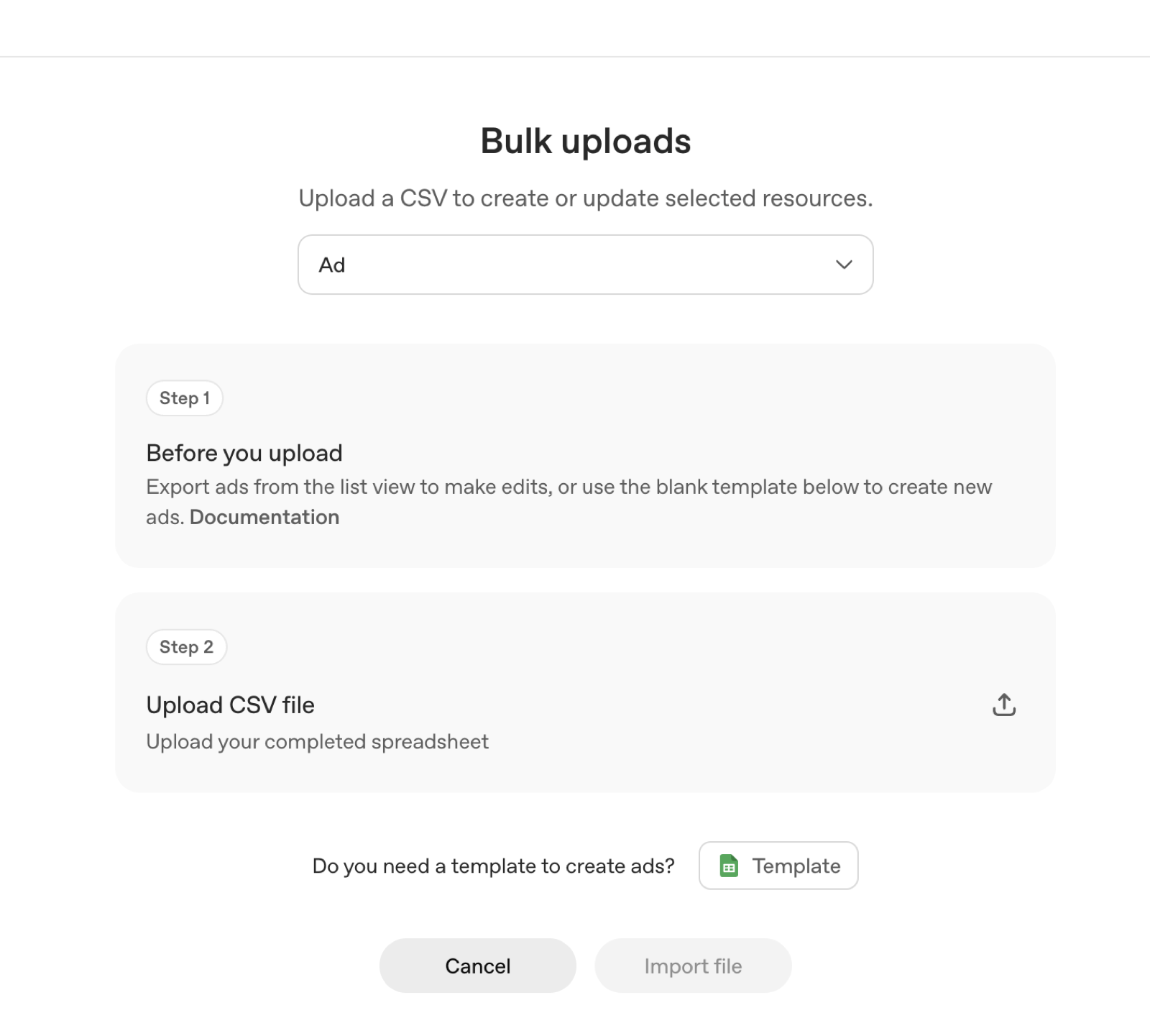
The upload path: Tools → Feeds
Inside OpenAI Ads Manager at ads.openai.com, the feed workflow lives under Tools → Feeds. The self-serve beta has been open since May 2026 with no minimum lifetime spend (OpenAI, May 2026), so any Shopify merchant with a verified account can do this today - account setup requires business details, a tax ID, a billing method, Persona verification, and an account logo before anything serves.
The sequence:
- Create the feed under Tools → Feeds and supply your Google Shopping-format catalog.
- Let validation run. Items with missing or malformed required attributes get flagged; fix them at the source (Shopify product data or your feed app), not in a one-off edited file you will forget about.
- Attach the feed to a campaign with a Clicks objective, set context hints for the ad group, and set budget - the minimum daily budget is $25, and $3-5 CPC is the recommended starting range for most retail categories (OpenAI docs; WebFX, 2026).
Delivery ramps slowly during the beta by design (OpenAI onboarding), so give a new feed campaign a full conversion window before judging it. Billing is postpay.
The 100-SKU rule - and why small stores still qualify
The feed minimum is 100 SKUs, with support up to 1 million (OpenAI Ads Manager docs, June 2026). Read that as feed items, not Shopify products. In Google Shopping format, every variant is its own row: a t-shirt in five sizes and four colors is 20 items sharing one item_group_id. A focused DTC store with 30 parent products and normal variant depth usually clears 100 comfortably.
If you genuinely sit below the line - a three-SKU supplement brand, say - feed ads are not your entry point. Standard ChatGPT ads with hand-built creative have no SKU minimum, and the organic layer has no minimum at all. Start with our setup guide for running ads on ChatGPT instead.
Do not pad the feed to hit 100. Duplicated or near-identical items are the kind of noise that hurts matching in a system where a language model, not a keyword index, decides relevance.
Feed hygiene: the three things that decide what serves
Variants need item_group_id - everywhere. Shopify's channel handles this automatically, but third-party feed apps sometimes drop it on custom exports. Without it, twenty variants look like twenty unrelated products, and your feed reads as padded rather than deep.
GTINs matter more here than on Google. ChatGPT's matching leans on entity recognition - knowing exactly which product this is. A correct GTIN (barcode field in Shopify) anchors your item to a known product entity. Missing or recycled GTINs are the classic Merchant Center disapproval reason, and the same data problem follows your feed to OpenAI.
Availability must be live, not aspirational. An ad matched into a high-intent conversation that lands on a sold-out product page is the most expensive click you can buy. Keep the feed sync frequent enough that availability reflects reality, and suppress out-of-stock items rather than letting them serve. This is the same discipline we describe in optimizing your product catalog for AI - the organic and paid layers read from the same underlying data quality.
Pixel setup for Shopify
Feed ads without conversion tracking are unattributable referrals. OpenAI's measurement stack is a browser pixel (oaiq.min.js, which stores the click id in a first-party __oppref cookie) plus a server-side Conversions API at bzr.openai.com/v1/events, with events deduplicated on a shared event_id and a default 30-day conversion window (OpenAI Help Center, 2026).
On Shopify specifically:
- Base snippet in the theme head. The pixel must load on every landing page - that first pageview is where the click id gets captured into the cookie. A snippet in
theme.liquidcovers the storefront. - Purchases server-side. Shopify's checkout is the hard part for any third-party browser pixel; the robust path is sending
order_createdevents through the Conversions API from your backend or a middleware, keyed to the sameevent_idyou fire client-side so nothing double-counts.
We walk the full four-step flow - data source, conversion event, implementation, campaign link - in our conversion tracking setup guide. Get it live before spend does; attribution windows only look backward.
Set expectations with real numbers: the chatbot ad benchmark is roughly 0.9% CTR against Google search's ~6.4% (eMarketer, 2026). Our own US campaigns since July 2026 have averaged ~1.3% (our campaign data). Agencies are still reporting measurement gaps and unproven outcomes across the channel (eMarketer/Digiday, 2026) - which is exactly why your own pixel data, not platform promises, should decide your second month's budget.
Where Tru Commerce fits
A product feed gets you into the sponsored box - the layer that is bought and labeled, and shown only to Free and Go users. It buys nothing in the organic recommendation, the layer every user sees, including the Plus and Pro subscribers who never see ads at all. As our founder put it in The Hindu BusinessLine (August 2026): "Brands cannot buy influence over ChatGPT's answers." AI-referred visits to US retail sites convert 60% better than non-AI traffic (Adobe Analytics via Digital Commerce 360, July 2026 data), and most of that traffic flows through the earned layer.
So sequence it: before you spend $25 a day renting conversations, find out whether ChatGPT already recommends you when nobody is paying. Run the free Citation Rank scan - it shows where your brand stands across AI surfaces in 24 hours. Then use our ChatGPT Ads hub to decide what the paid layer should do on top. The same clean catalog powers both.
Worth checking what this channel already drives for you: for MyMuse, GA4 reported ₹11.5K/mo of AI revenue when the real number was ₹81.2K/mo - read the MyMuse case study. The usual first step is ChatGPT Ads for ecommerce brands.
FAQ
Yes. OpenAI's product feed ads, launched June 2026, accept a Google Shopping-format catalog - the same attribute set Shopify's Google & YouTube channel already produces. Upload it under Tools → Feeds in Ads Manager (OpenAI Ads Manager docs; Digiday, June 2026).
The minimum is 100 SKUs and the ceiling is 1 million (OpenAI Ads Manager docs, June 2026). In Google Shopping format each variant is its own row, so a store with 30 products in multiple sizes and colors can clear 100 feed items.
Place the oaiq.min.js base snippet in your theme's head so every landing page captures the click id into the __oppref cookie, then send purchase events server-side through the Conversions API with a shared event_id so nothing double-counts.
Minimum daily budget is $25, with recommended starting bids of $3-5 CPC in most retail categories (OpenAI docs; WebFX, 2026). Billing is postpay. There is no minimum lifetime spend since the self-serve beta opened in May 2026.
No. OpenAI has stated since February 2026 that ads never influence answers, and paying subscribers on Plus, Pro, Business, Enterprise, and Education tiers never see ads at all. The organic recommendation is a separate, earned layer.
Sources
- 1.Ads in ChatGPT: The Basics - OpenAI Help Center, 2026
- 2.OpenAI makes it easier to run shopping ads in ChatGPT - Digiday, 2026
- 3.Create campaigns for ChatGPT - OpenAI Help Center, 2026
- 4.Adobe: AI referral traffic to retail sites converts 60% higher, July 2026 data - Digital Commerce 360, 2026
Continue reading
October 10, 2026
ChatGPT Ads in India: six weeks in, on the record
ChatGPT Ads switched on in India on 27 August 2026. Six weeks on, eight articles in five outlets quoted us and TechTimes cited our benchmarks. Every question the press asked, every answer verbatim and linked, and the numbers behind each one.
September 4, 2026
Criteo Prompt Smart Ads: 2,000 Brands on ChatGPT and a 4x Spend Lift
Criteo was the first ad-tech partner inside OpenAI's ChatGPT ads pilot. Its Prompt Smart Ads product auto-generates creatives and context hints matched to how people actually prompt - here is what it is, the numbers behind it, and what its creative reports teach every advertiser.
September 2, 2026
ChatGPT Ads Conversion Strategies: What the Query-Mix Data Says to Do
Only ~1 in 10 ChatGPT conversations carries commercial intent, 76.4% of shopping answers already show an ad, and market leaders buy almost none of them. Four strategies built on that data - not on search-ads instinct.