
ChatGPT Ads Conversion Tracking: Pixel and Conversions API, Step by Step
How to set up ChatGPT ads conversion tracking with OpenAI's pixel and Conversions API: the 4-step Ads Manager flow, the __oppref click id, event_id deduplication, and why the event you link now powers conversion-optimized bidding.
Viren Inaniyan · August 29, 2026 · ChatGPT Ads
ChatGPT ad clicks without conversion tracking are just expensive referrals you can't attribute. OpenAI ships two measurement paths - a JavaScript pixel and a server-side Conversions API - and the conversion event you wire up now also powers conversion-optimized bidding. Here's how both paths work, how they deduplicate, and the setup order that avoids losing your first campaign's data.
Why tracking got more important in 2026
When ChatGPT ads launched in the US on February 9, 2026, conversion tracking was a reporting nicety - campaigns bid on CPM or plain CPC either way. That changed with conversion-optimized CPC: OpenAI now optimizes delivery toward the conversion event you select, while still charging per click (OpenAI Help Center, "Create campaigns for ChatGPT," 2026).
That makes the pixel a bidding input, not just a scoreboard. A campaign with no linked conversion event can't use conversion optimization at all, and one linked to a weak event - page views dressed up as leads - optimizes toward the wrong thing. Agencies already report measurement gaps as their top complaint about the channel (eMarketer/Digiday, 2026). The fix is unglamorous: set tracking up in the right order before the first dollar of spend. New to the channel? Start with our campaign setup guide - but do the tracking below first.
The four-step flow Ads Manager walks you through
Under Tools → Conversions, OpenAI lays out the sequence: create a data source, create a conversion event, implement and log the event, link the event to a campaign. Each step gates the next.
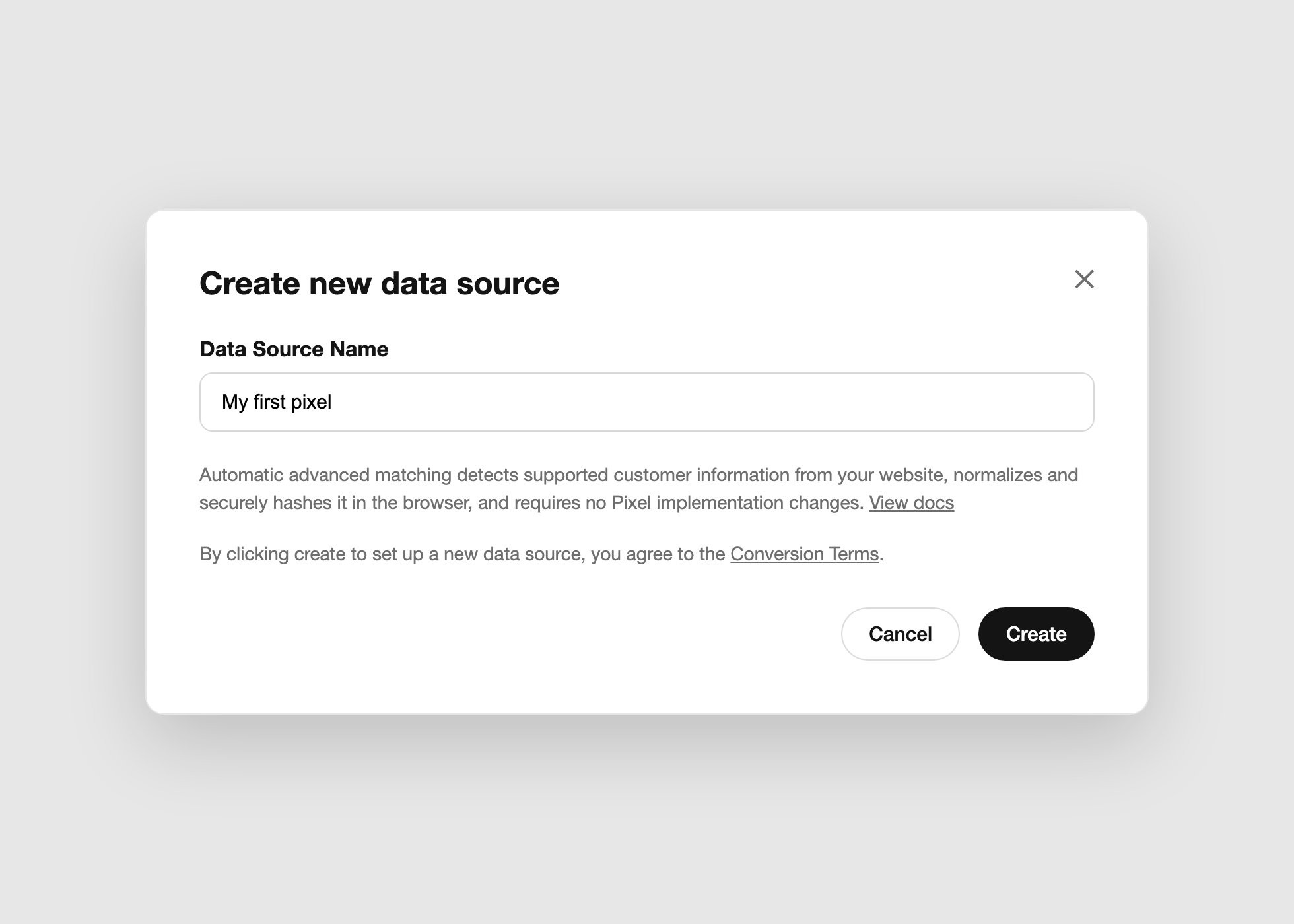
Creating the data source (recreated view): naming your pixel enables automatic advanced matching — customer info is normalized and hashed in the browser, no code changes required.
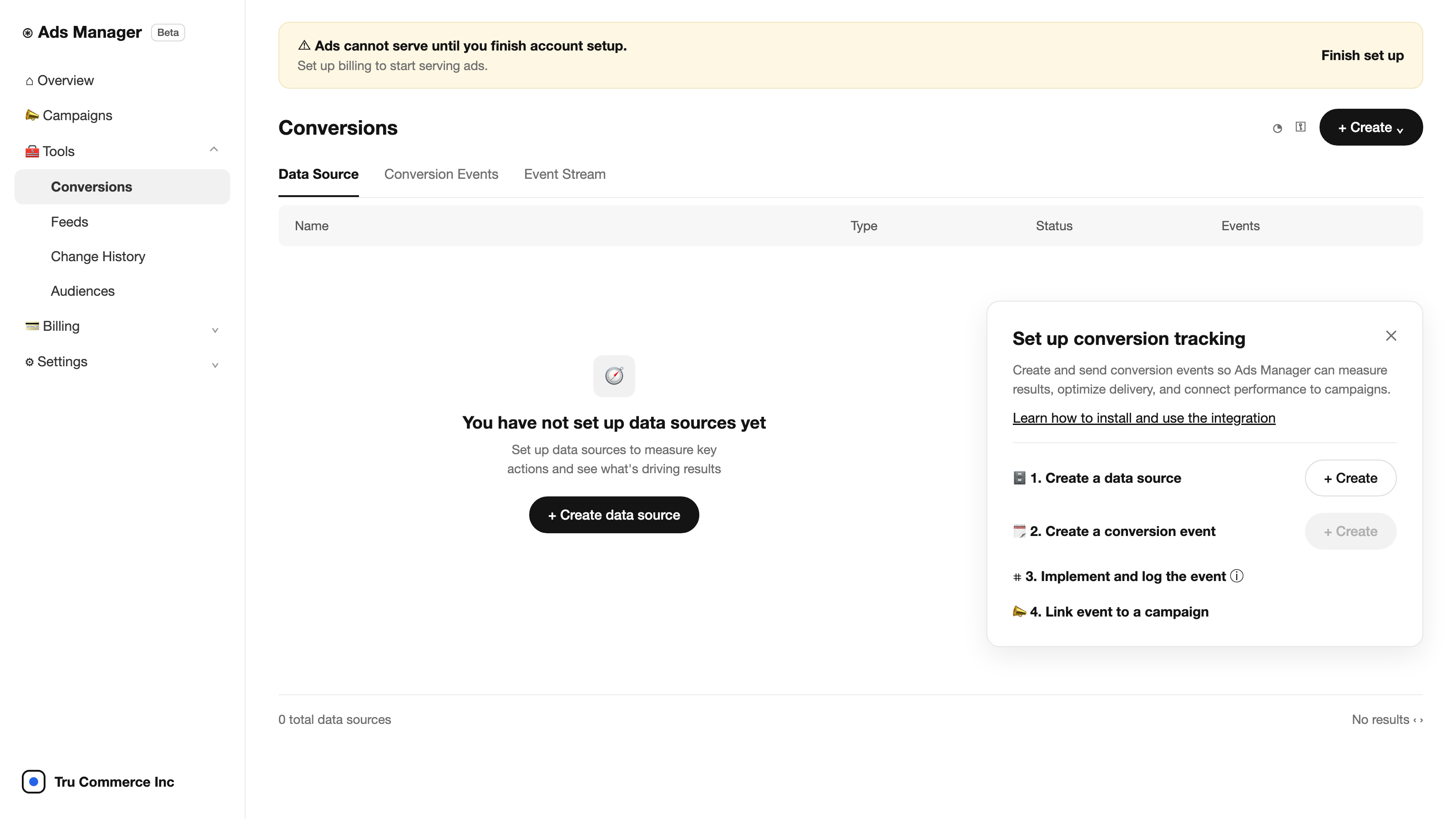
Tools → Conversions (recreated view): the four-step wizard — data source, conversion event, implement, link to campaign — with tabs for the event table and a live Event Stream.
1. Create the data source (your pixel)
The data source is the pixel - creating one issues a Pixel ID. One pixel per site is the right default; you'll reuse the same ID for the Conversions API later.
2. Create the conversion event
Name the event for the action, not the page - lead_created, not "thank-you-page." OpenAI supports standard event types including lead_created, registration_completed, checkout_started, order_created, subscription_created, and trial_started, plus custom events. Pick the standard type that matches your funnel; standard types are what campaign optimization can read. The default conversion window is 30 days.
3. Implement the pixel
The snippet loads oaiq.min.js from OpenAI's CDN and initializes with your Pixel ID - it belongs in the <head> of every page, not just the conversion page, because the landing-page visit is where the oppref click id gets captured into the __oppref cookie. Events then fire with one call:
oaiq("measure", "lead_created", {}, { event_id: crossSystemUniqueId });Two implementation notes that bite single-page apps:
- Client-side routing doesn't reload the page. If your site is Next.js, React, or anything with an app router, fire
page_viewedon route changes yourself - otherwise OpenAI sees one page view per session. - Generate an
event_idfor every conversion event now, even if you haven't built the server side yet. It's the dedup key that makes adding the Conversions API later painless.
4. Link the event to a campaign
The final step connects the conversion event to your campaign so reporting and bid optimization can see it. This is the step conversion-optimized CPC depends on: the linked event is the signal OpenAI optimizes delivery toward. An unlinked event still logs - but the campaign optimizes blind, and conversion-optimized bidding isn't an option at all.
The Conversions API, for when the browser isn't enough
Ad blockers, iOS privacy features, and consent choices all eat pixel events. The server-side path posts the same events to https://bzr.openai.com/v1/events with a bearer API key from Ads Manager; events can be batched, and OpenAI enforces recency limits on event timestamps (per OpenAI's Conversions API documentation).
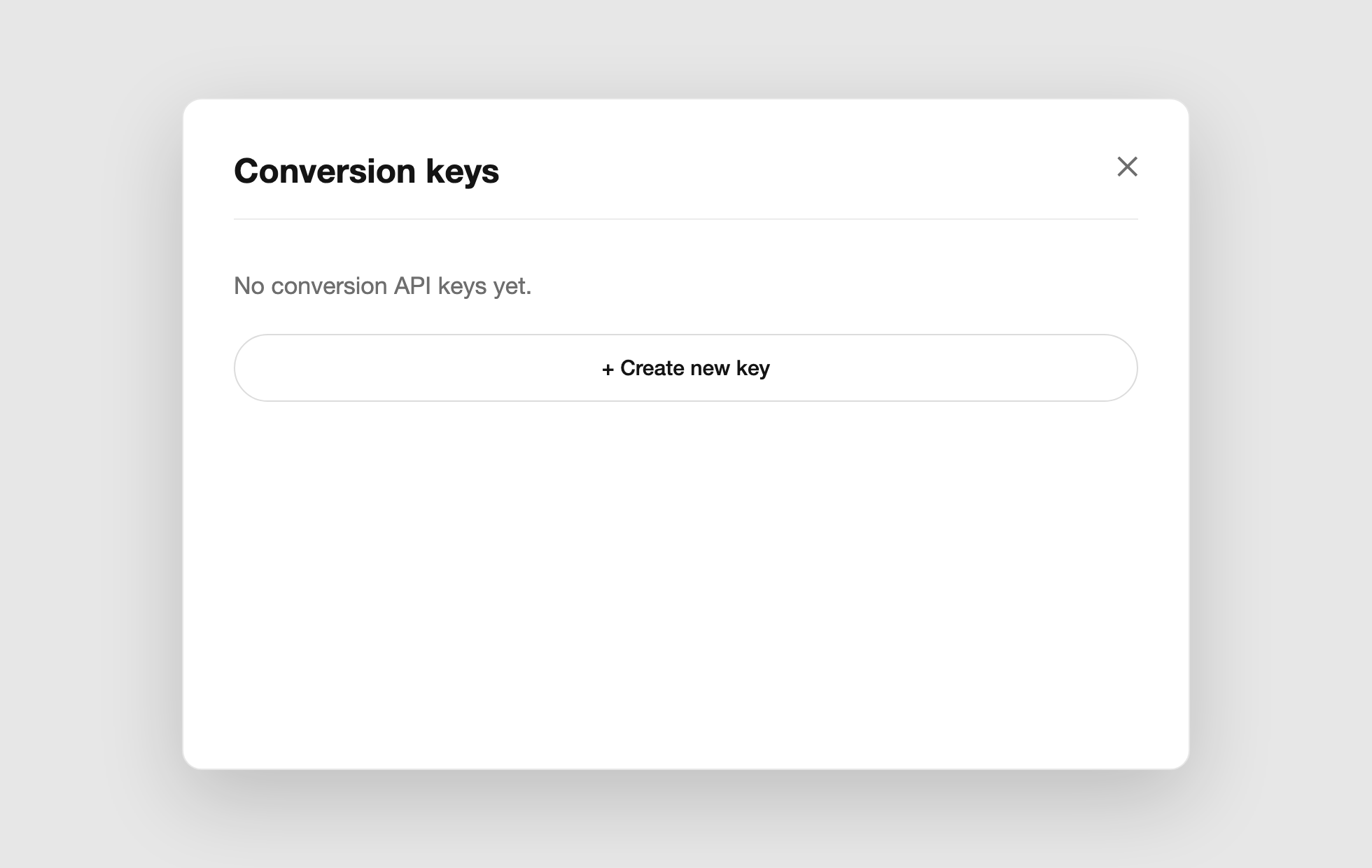
Conversions API credentials live behind the key icon on the Conversions screen (recreated view) — create a key here and use it as the bearer token for server-side events.
Two things the API does not do for you:
- It doesn't capture
oppref. The pixel reads the click id from the URL automatically; your server has to capture it from the landing page (or the__opprefcookie) and pass it with the event, or the conversion can't be matched to the click. - It doesn't dedupe by accident. Send the same
event_idand event name from browser and server against the same Pixel ID, and OpenAI keeps the first arrival, discards the second. Different ids = double-counted conversions and inflated reporting.
User matching fields (email, phone, names) must be SHA-256 hashed after normalization - lowercase, trimmed. Only send what your privacy policy and user consent actually cover.
One more honesty note: pixel-tracked conversions are the floor, not the ceiling. ChatGPT-referred visits routinely land as Direct in GA4 - the attribution gap we cover in our dark agentic commerce traffic guide - so read your OpenAI numbers alongside, not instead of, your analytics.
Where each piece lives in the UI
Three details worth knowing before you start clicking (Ads Manager UI, August 2026):
- The Conversions screen has three tabs. Data Source holds your pixels; Conversion Events lists each event with its base event, pixel, campaigns using it, and identifier coverage; Event Stream is the live debugger — the fastest way to confirm your first test event actually arrived.
- Advanced matching is set at data-source creation. The create dialog states it "detects supported customer information from your website, normalizes and securely hashes it in the browser, and requires no Pixel implementation changes." Creating a data source also accepts OpenAI's Conversion Terms — loop in whoever owns privacy review.
- API keys are separate from the pixel. The key icon on the Conversions screen opens the Conversion keys panel; a new account has none until you create one. That key is the bearer token the Conversions API needs for server-side events.
The same setup works in every market - including India
The pixel, the Conversions API, and the four-step flow are identical whether your account bills in dollars, pounds, or rupees. What differs is timing. The US has had ads since February 2026; the UK, Canada, Australia, New Zealand, Japan, and Korea followed through mid-2026; and India switched on August 27, 2026, with 50+ brands live in the first week (The Hindu BusinessLine, Aug 28, 2026).
The date that matters for Indian merchants: self-serve opens September 4, 2026 - Ads Manager available to any Indian business at a ₹725 minimum daily budget, no agency required (Storyboard18, 2026). If that's you, wire the tracking above this week, before campaigns can go live; clicks that happen before your pixel exists are unrecoverable. For the market-by-market timeline, see our rollout tracker.
What we did on our own site
We wired the pixel behind an environment variable so the code shipped before the pixel existed, then mapped our existing GA4 lead events - form submits from the free Citation Rank scan, contact routes, and gated downloads - to a single OpenAI lead_created event with a generated event_id on every fire. One conversion event, six forms covered, and the Conversions API can slot in later without double-counting.
That single-event setup matters more now that campaigns optimize toward the event you link. Feed it your realest signal. For us that's a scan request - the entry point behind every engagement in our case studies. In our US campaigns running since July 2026, CTR has averaged ~1.3% (our campaign data) - decent clicks, but without this event wiring we'd have no idea which of them turned into revenue.
Where Tru Commerce fits
Conversion tracking tells you what the ad budget bought. It says nothing about the layer above it: whether ChatGPT recommends you organically when a shopper asks what to buy. Those are separate systems - ads never influence ChatGPT's answers (OpenAI, 2026) - and the organic layer is the only one Plus and Pro users ever see. It also converts remarkably well: AI-referred visits to US retail sites convert 60% better than non-AI traffic (Adobe Analytics via Digital Commerce 360, July 2026 data).
So sequence it: measure the earned layer before you rent the paid one. Run the free Citation Rank scan to see whether ChatGPT already cites your brand - results in 24 hours, no login. Then, if you do buy the sponsored box, the pixel setup above tells you exactly what it's worth. Everything else we've learned about the channel lives on our ChatGPT Ads hub.
Before writing the channel off, measure it - MyMuse's real AI revenue turned out to be 7× what GA4 reported - see the MyMuse case study. If you want to see where you stand before committing, start with ChatGPT Ads for ecommerce brands.
FAQ
Yes. OpenAI's measurement pixel (oaiq.min.js) captures a click id called oppref from your landing page URL, stores it in a first-party __oppref cookie, and attaches it to conversion events you fire. You create the pixel under Tools → Conversions in Ads Manager.
Two paths: the browser pixel and the server-side Conversions API (bzr.openai.com/v1/events). Run the pixel first, add the API for redundancy. Both dedupe on a shared event_id, so generate one per conversion from day one. Default attribution window is 30 days.
oppref is OpenAI's click id. It arrives as a URL parameter when someone clicks your ad; the pixel stores it in a __oppref cookie so later conversion events can be matched back to the click. Server-side events must pass it explicitly.
Yes. Alongside CPM and CPC, OpenAI offers conversion-optimized CPC: delivery is optimized toward the conversion event you link to the campaign, but you still pay per click (OpenAI Help Center, 2026). No linked event means no conversion optimization.
Yes - the pixel and Conversions API are the same in every market. India ads went live August 27, 2026, and self-serve opens to all Indian businesses September 4, 2026 at a ₹725 minimum daily budget (Storyboard18, 2026). Install tracking before launch.
Sources
- 1.Ads in ChatGPT: The Basics - OpenAI Help Center, 2026
- 2.Ads Measurement Pixel documentation - OpenAI Developers, 2026
- 3.Ads Conversions API documentation - OpenAI Developers, 2026
- 4.Conversion measurement - OpenAI Help Center, 2026
- 5.Adobe: AI referral traffic to retail sites converts 60% higher, July 2026 data - Digital Commerce 360, 2026
Continue reading
October 10, 2026
ChatGPT Ads in India: six weeks in, on the record
ChatGPT Ads switched on in India on 27 August 2026. Six weeks on, eight articles in five outlets quoted us and TechTimes cited our benchmarks. Every question the press asked, every answer verbatim and linked, and the numbers behind each one.
September 4, 2026
Criteo Prompt Smart Ads: 2,000 Brands on ChatGPT and a 4x Spend Lift
Criteo was the first ad-tech partner inside OpenAI's ChatGPT ads pilot. Its Prompt Smart Ads product auto-generates creatives and context hints matched to how people actually prompt - here is what it is, the numbers behind it, and what its creative reports teach every advertiser.
September 2, 2026
ChatGPT Ads Conversion Strategies: What the Query-Mix Data Says to Do
Only ~1 in 10 ChatGPT conversations carries commercial intent, 76.4% of shopping answers already show an ad, and market leaders buy almost none of them. Four strategies built on that data - not on search-ads instinct.